- Fundamentals
- Variables
- Strings
- Lists
- Operations
- List Operations
- String Formatting
- Classes
- Dictionaries
-
LMLGuide to AP CSP
This chapter deals with higher level programming such as python, java, c++, etc. For the sake of learning, we will use python in this lesson as it is easy to learn, widely used, and once you learn the fundamentals of programming; can be applied in any other context.
Python is a very simple language, and has a very straightforward syntax. It encourages programmers to program without boilerplate (prepared) code. The simplest directive in Python is the "print" directive - it simply prints out a line (and also includes a newline, unlike in C).
There are two major Python versions, Python 2 and Python 3. Python 2 and 3 are quite different. This tutorial uses Python 3, because it more semantically correct and supports newer features.
For example, one difference between Python 2 and 3 is the print statement. In Python 2, the "print" statement is not a function, and therefore it is invoked without parentheses. However, in Python 3, it is a function, and must be invoked with parentheses.
To print a string in Python 3, just write:
Python uses indentation for blocks, instead of curly braces. Both tabs and spaces are supported, but the standard indentation requires standard Python code to use four spaces. For example:
Python is completely object oriented, and not "statically typed". You do not need to declare variables before using them, or declare their type. Every variable in Python is an object.
Python supports two types of numbers - integers(whole numbers) and floating point numbers(decimals). (It also supports complex numbers, which will not be explained in this tutorial).
To define an integer, use the following syntax:
To define a floating point number, you may use one of the following notations:
Strings are defined either with a single quote or a double quotes.
To define a floating point number, you may use one of the following notations:
Mixing operators between numbers and strings is not supported:
Lists are very similar to arrays. They can contain any type of variable, and they can contain as many variables as you wish. Lists can also be iterated over in a very simple manner. Here is an example of how to build a list.
Mixing operators between numbers and strings is not supported:
Just as any other programming languages, the addition, subtraction, multiplication, and division operators can be used with numbers.
Accessing an index which does not exist generates an exception (an error).
Try to predict what the answer will be. Does python follow order of operations?
Another operator available is the modulo (%) operator, which returns the integer remainder of the division. dividend % divisor = remainder.
Using two multiplication symbols makes a power relationship.
Lists can be joined with the addition operators:
Just as in strings, Python supports forming new lists with a repeating sequence using the multiplication operator:
Python uses C-style string formatting to create new, formatted strings. The "%" operator is used to format a set of variables enclosed in a "tuple" (a fixed size list), together with a format string, which contains normal text together with "argument specifiers", special symbols like "%s" and "%d".
Let's say you have a variable called "name" with your user name in it, and you would then like to print(out a greeting to that user.)
To use two or more argument specifiers, use a tuple (parentheses):
Let's say you have a variable called "name" with your user name in it, and you would then like to print(out a greeting to that user.)
The first thing you learned was printing a simple sentence. This sentence was stored by Python as a string. However, instead of immediately printing strings out, we will explore the various things you can do to them. You can also use single quotes to assign a string. However, you will face problems if the value to be assigned itself contains single quotes. For example to assign the string in these bracket(single quotes are ' ') you need to use double quotes only like this
That prints out 12, because "Hello world!" is 12 characters long, including punctuation and spaces.
This prints a slice of the string, starting at index 3, and ending at index 6. But why 6 and not 7? Again, most programming languages do this - it makes doing math inside those brackets easier.
If you just have one number in the brackets, it will give you the single character at that index. If you leave out the first number but keep the colon, it will give you a slice from the start to the number you left in. If you leave out the second number, it will give you a slice from the first number to the end.
You can even put negative numbers inside the brackets. They are an easy way of starting at the end of the string instead of the beginning. This way, -3 means "3rd character from the end".
Python uses boolean logic to evaluate conditions. The boolean values True and False are returned when an expression is compared or evaluated. You Can View the different operators here, and try them out in the emulator found under resources
Comparison operators are used to compare two values:
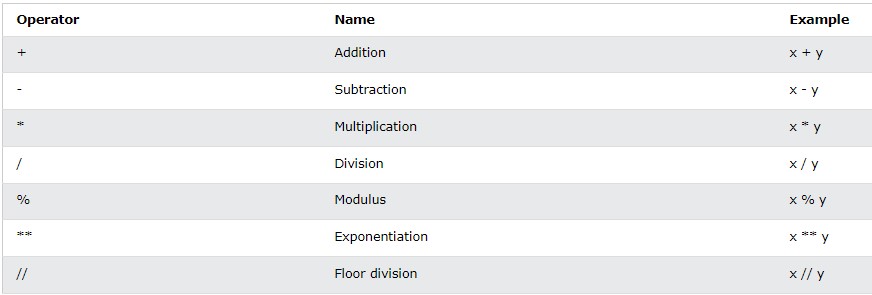
“Python Operators.” Python Operators, https://www.w3schools.com/python/python_operators.asp.
Logical operators are used to combine conditional statements:
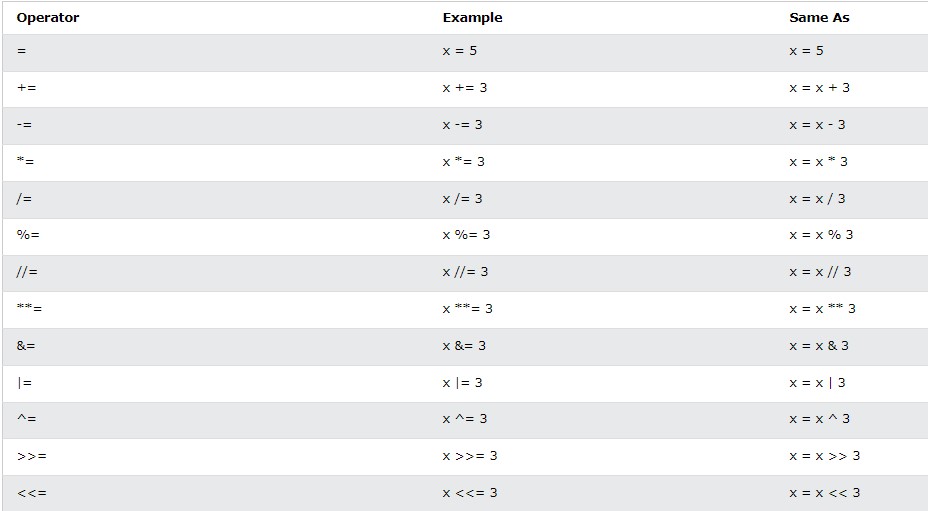
“Python Operators.” Python Operators, https://www.w3schools.com/python/python_operators.asp.
Identity operators are used to compare the objects, not if they are equal, but if they are actually the same object, with the same memory location:

“Python Operators.” Python Operators, https://www.w3schools.com/python/python_operators.asp.
Membership operators are used to test if a sequence is presented in an object:

“Python Operators.” Python Operators, https://www.w3schools.com/python/python_operators.asp.
Bitwise operators are used to compare (binary) numbers:
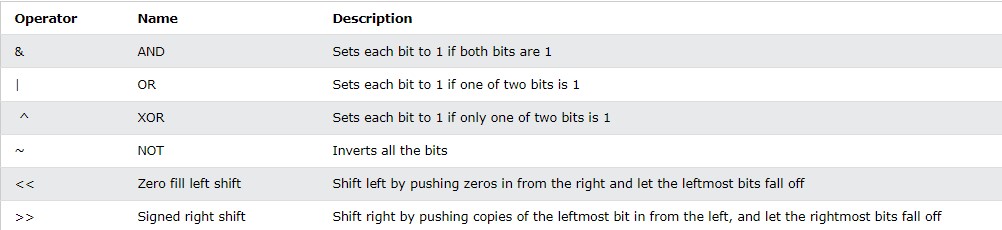
“Python Operators.” Python Operators, https://www.w3schools.com/python/python_operators.asp.
For loops iterate over a given sequence. Here is an example:
For loops can iterate over a sequence of numbers using the "range" and "xrange" functions. The difference between range and xrange is that the range function returns a new list with numbers of that specified range, whereas xrange returns an iterator, which is more efficient. (Python 3 uses the range function, which acts like xrange). Note that the range function is zero based.
While loops repeat as long as a certain boolean condition is met. For example:
break is used to exit a for loop or a while loop, whereas continue is used to skip the current block, and return to the "for" or "while" statement. A few examples:
Unlike languages like C,CPP.. we can use else for loops. When the loop condition of "for" or "while" statement fails then code part in "else" is executed. If a break statement is executed inside the for loop then the "else" part is skipped. Note that the "else" part is executed even if there is a continue statement.
Objects are an encapsulation of variables and functions into a single entity. Objects get their variables and functions from classes. Classes are essentially a template to create your objects.
A very basic class would look something like this:
We'll explain why you have to include that "self" as a parameter a little bit later. First, to assign the above class(template) to an object you would do the following:
Now the variable "myobjectx" holds an object of the class "MyClass" that contains the variable and the function defined within the class called "MyClass".
To access the variable inside of the newly created object "myobjectx" you would do the following:
So for instance the below would output the string "blah":
You can create multiple different objects that are of the same class(have the same variables and functions defined). However, each object contains independent copies of the variables defined in the class. For instance, if we were to define another object with the "MyClass" class and then change the string in the variable above:
To access a function inside of an object you use notation similar to accessing a variable:
The above would print out the message, "This is a message inside the class."
A dictionary is a data type similar to arrays, but works with keys and values instead of indexes. Each value stored in a dictionary can be accessed using a key, which is any type of object (a string, a number, a list, etc.) instead of using its index to address it.
For example, a database of phone numbers could be stored using a dictionary like this:
Dictionaries can be iterated over, just like a list. However, a dictionary, unlike a list, does not keep the order of the values stored in it. To iterate over key value pairs, use the following syntax:
To remove a specified index, use this notations: